Local advice
Security cameras for terrace houses: no-cable options in Sydney
How to add cameras to an inner Sydney terrace without cables on the facade: council heritage checks, solar and 4G options, and mounting on narrow fronts and rear lanes.
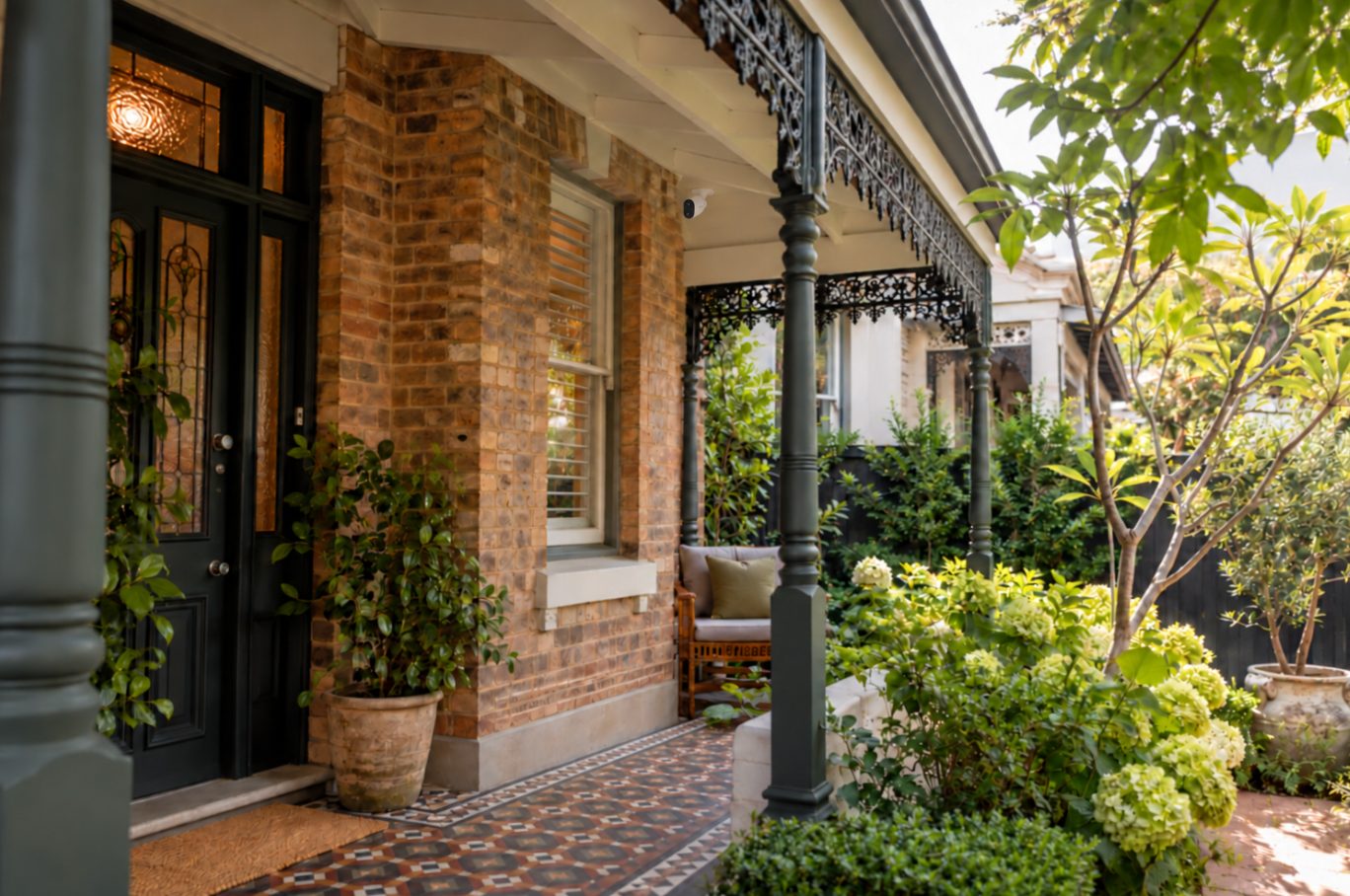
You can put security cameras on a Sydney terrace without running any cable across the facade. Battery, solar and 4G cameras and battery video doorbells each mount on a small bracket with a few screws, and connect over Wi-Fi or mobile signal. If your terrace is a heritage item or sits in a heritage conservation area, ask council before you drill the front, because even minor works there can need written sign-off.
Do you need council approval for a camera on a heritage terrace?
Many inner-Sydney terraces sit in a heritage conservation area (HCA), even when the house itself isn't individually listed. Special heritage controls apply to development on that land, so a small job like fixing a bracket to the front may still need council's sign-off.
Don't assume a statewide exemption covers you. The NSW planning exemption that specifically names security cameras, added to the Codes SEPP as Subdivision 35A, is for places of public worship, not houses. Some minor works in HCAs can still be exempt under the Codes SEPP, but whether that applies to a camera on your house is a question for council.
What follows is general information, not legal advice. Your council has the final say for your address.
Inner West Council
Inner West's heritage and development guidance says that if works alter external or internal built elements of a heritage site, you need to seek consent. The lightest consent pathway is a Heritage Exemption Certificate under clause 5.10(3) of the Inner West Local Environmental Plan 2022: council confirms in writing, before work starts, that the work is minor and won't adversely affect the heritage significance of the house or the area.
You lodge the application online with photos and a description, and a fee applies. Council's examples of typical certificate work are mostly repairs and maintenance, and cameras aren't mentioned either way. Council recommends contacting its Duty Planning Service before you start any works, which is the quickest way to find out which pathway applies.
City of Sydney
The City of Sydney handles this through a local heritage exemption request, lodged through its ePlanning service. Works can go ahead without a development application only once council has been notified and given approval in writing. Fees may apply, and the City says to keep the written confirmation with your records.
The City describes these requests as typically like-for-like repairs, so a new camera may not fit neatly. Its page also links to the City's own advice service if you're unsure.
State-listed terraces
Some terrace rows are on the State Heritage Register. The City of Sydney says a state-listed building in its area needs both a local heritage exemption and a state heritage works approval, unless the work falls under a standard or site-specific exemption, in which case neither is needed. In other council areas, check with council and Heritage NSW.
A practical way to check
- Look up your address. In the Inner West, use the NSW Planning Portal Spatial Viewer or a planning certificate. In the City of Sydney, use the interactive map linked from the heritage exemption page.
- If it's in an HCA or listed, write down exactly what you plan: how many cameras, where, how they're fixed, and that there's no new cabling.
- Call the council duty planner and describe the work.
- If they tell you to lodge an exemption request, include photos of each mounting spot.
- Keep the written reply.
If you rent, you also need your landlord's consent. We cover that in security cameras in a NSW rental.
Which wire-free cameras suit a terrace?
A wired system means running cable through ceilings and down walls, which is exactly the kind of visible change heritage controls aim to limit. Wire-free cameras avoid most of that, but each type has its own catch on a terrace.
| Option | How it's powered | Best spot on a terrace | Watch out for |
|---|---|---|---|
| Battery Wi-Fi camera | Rechargeable battery | Front verandah, rear courtyard | Recharging every so often; Wi-Fi through internal brick walls |
| Solar camera | Battery topped up by a small panel | Rear courtyard or lane with some direct sun | Narrow, shaded lots; panel placement |
| Battery video doorbell | Rechargeable battery | Front door frame | Footpath traffic causing constant alerts |
| 4G solar camera | SIM card and solar panel | Rear lane gate or garage beyond Wi-Fi range | Mobile signal and a data plan |
| Plug-in Wi-Fi camera | Mains power lead | Only where a power point is already within reach | The lead itself is the cable you were trying to avoid |
For most terraces, the realistic mix is a doorbell at the front and a battery or solar camera at the back. If you're unsure between battery and solar, our guide to battery, solar or plug-in cameras goes through the trade-offs. For a rear-lane garage without Wi-Fi, a 4G security camera is usually the simplest answer.
Where to mount a camera on a narrow terrace front
A terrace front is narrow, usually a verandah, a door, one window and very little bare wall. That limits where a camera can go, but it also makes the good spots easy to find.
- Under the verandah. A camera on the verandah beam or ceiling looks down the path to the front door and sits out of the main view of the facade. It's also fixed into timber rather than brick or sandstone.
- On the door frame. A video doorbell goes where a bell button would sit anyway. Measure the frame first, because some old terrace frames are narrower than modern doorbells.
- Keep off the decorative parts. Cast-iron lace, timber fretwork, sandstone sills and tiled paths are the original features heritage controls protect. Don't fix anything to them.
- If masonry is the only option, drill into the mortar joints rather than the face of the brick. Mortar is far easier to patch if the camera is ever moved.
- Upstairs balconies give a better view along the street, but they count as high access, which takes more time and costs more.
The other problem with a terrace front is the footpath right outside it. A camera aimed at the door will also pick up everyone walking past. In our own measurements, real cameras were triggered between 34 and 135 times a day, far more than the 10 to 15 people often expect. On a busy business driveway, switching a camera to person-only detection with a detection zone cut its recordings by about 97%, from around 1,300 a day to under 40.
On a terrace, set the detection zone to cover your gate, path and door, and leave out the footpath. Our post on security camera false alerts covers the settings step by step.
Cameras for rear courtyards and back lanes
The back of a terrace has different problems: Wi-Fi reach, shade and the lane itself.
Wi-Fi. The router is often at the front of a long, narrow house, with several solid internal walls between it and the courtyard. Before mounting anything, stand at the spot with your phone and check the signal. If it's weak, a mesh node towards the back of the house usually fixes it more cheaply than changing the camera.
Shade. Courtyards between high party walls can get only a few hours of direct sun, especially in winter. A separate panel helps, because it can sit higher than the camera. Reolink's Solar Panel, Solar Panel 2 and Solar Panel 3 each list a 4-metre cable, so the panel can go on the top edge of a rear wall or skillion while the camera stays under the eave. Reolink advises against more than 9 metres of extension cable in total, because it can cause power loss or unstable charging. Its DC-powered cameras aren't compatible with its solar panels at all.
The lane. A camera over a rear gate will record people using the lane. Aim it at your own gate and garage door, and use a detection zone so that passing cars and bin collections don't fill your phone with alerts.
Neighbours, party walls and the law
Terraces share walls, fences and sometimes a verandah divider, so it's easy to fix something to a wall that isn't fully yours. Section 8 of the Surveillance Devices Act 2007 (NSW) makes it an offence to knowingly install, use or maintain a camera on premises to record an activity where that involves entering the premises without the express or implied consent of the owner or occupier. In practice, don't put a camera on your neighbour's side of a party wall or a shared fence without their agreement.
The same Act regulates listening devices separately (section 7), and there are exceptions in section 8A. If your camera records sound and faces a footpath or lane, consider whether you need audio at all. For your specific situation, check the current legislation or get legal advice.
Aiming cameras at your own entry points, rather than into next door's courtyard or windows, also heads off most neighbour disputes before they start.
How much does a wire-free terrace install cost?
WireFree Security's installation prices start at:
- Standard installation, 1 camera: from $149
- Standard installation, 2 cameras: from $289
- Solar camera installation, 1 camera: from $199
- 4G solar camera, first camera: from $249
- Masonry, concrete or difficult surface: from $40 per camera
- Double-storey or high access: from $100 per camera
The final price depends on the site, and the full list is on our installation prices page. Plenty of people fit a doorbell or a single battery camera themselves. An installer is mostly worth paying for high balconies, brick or sandstone fixings, solar panel placement and setting up detection zones so the camera ignores the footpath.
Checklist before you buy
- Check whether your address is in an HCA or is a listed heritage item.
- Ask council what written exemption or consent you need before drilling the front.
- Test the Wi-Fi signal at every mounting spot, especially the courtyard.
- Look at how much direct sun the back gets in winter, not just summer.
- Plan detection zones that exclude the footpath and lane.
- Keep everything on your side of party walls and shared fences.
- Choose fixings that come out cleanly: timber where possible, mortar joints if not.
A terrace doesn't need a cabled system to be well covered. Usually a doorbell at the front, one camera at the back and careful detection settings are enough. Check the heritage position first, keep fixings small and reversible, and test the Wi-Fi before you drill.
Common questions
Will a wireless camera work through the brick walls of a terrace?
Often, but not always. Terraces are long and narrow, with solid internal walls between a router at the front and a courtyard at the back. Before buying, stand at the planned mounting spot with your phone and check the Wi-Fi signal. If it's weak, a mesh Wi-Fi node towards the back of the house usually fixes it. For a rear-lane garage beyond Wi-Fi range, a 4G camera with a SIM card avoids the problem.
Can I install a camera on my terrace myself?
Yes, many people fit a battery video doorbell or a single battery camera themselves with basic tools. Check the heritage position with council first if you're in a conservation area, and fix into timber or mortar joints rather than face brick or sandstone. An installer is mainly worth it for high balconies, difficult masonry, solar panel placement and setting detection zones so the camera doesn't alert on every passer-by.
Is a video doorbell enough for a terrace house?
For the front, often yes. Most terraces have one entry from the street, and a doorbell covers the door, the path and parcel deliveries. It won't cover the back, though, and rear courtyards and lanes are another way in on many terraces. A sensible minimum for most terraces is a doorbell at the front plus one battery or solar camera covering the back door or rear gate.
What happens to the footage if someone steals the camera?
If recordings are only on the camera's memory card, they go with the camera. For Reolink cameras, WireFree Cloud keeps an off-site copy of each recording on servers in Sydney, uploaded over an encrypted connection, so you can still view and download clips if the camera is taken. Not every Reolink model can upload directly, and some older models need a Reolink Home Hub.
Sources
- Gain exemption from requiring development consent for heritage works — City of Sydney
- Heritage and development — Inner West Council
- Security measures for places of public worship — NSW Planning Portal
- Getting Started with Reolink Solar Panel — Reolink Support
- Surveillance Devices Act 2007 No 64 — NSW Legislation
- Surveillance Devices Act 2007 – s 8 — AustLII
General information, not legal advice. Prices are “from” prices; your quote depends on the site.