Small business
Construction site security cameras: 4G and solar with no power
No power, no NBN, tools on site overnight. How 4G solar cameras work on Sydney building sites and vacant properties, where to mount them, and what they cost to run.
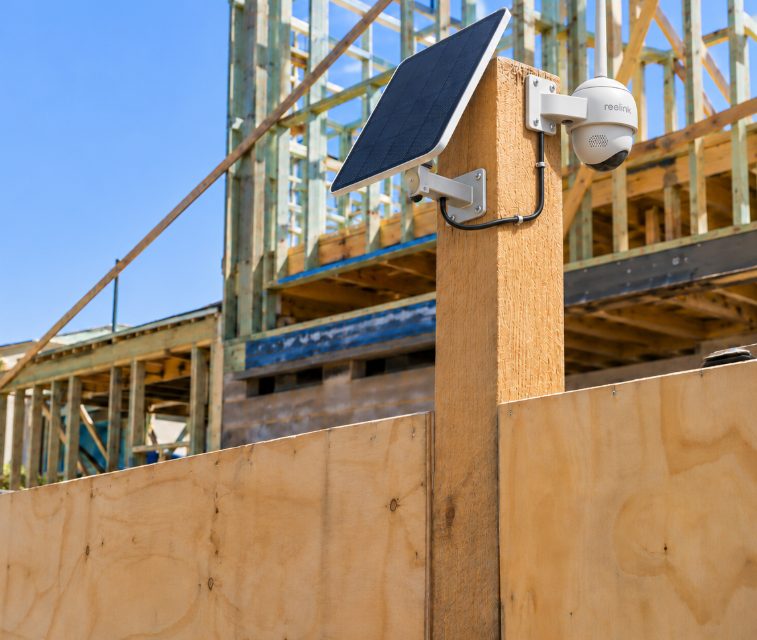
A 4G solar camera can watch a building site or empty property that has no mains power and no internet. A small solar panel keeps the battery charged, and a SIM card in the camera sends alerts and live view to your phone over the mobile network. For a renovation, knockdown-rebuild or vacant house in Sydney, one to three of these cameras on the hoarding, scaffold or a pole usually covers the gate, the materials and the site shed.
They suit small and medium sites well. They don't replace locking tools away, and nobody watches the footage for you. Here's how they work, where to put them, and what they cost to run.
When a 4G solar camera makes sense (and when it doesn't)
Choose 4G and solar when there's no reliable power to tap and no Wi-Fi to join. On most sites that's the stretch from demolition until the electrician connects permanent power. Vacant properties often end up the same way once the power and internet accounts are closed.
| Situation | Usually the right fit | Why |
|---|---|---|
| Renovation, owner still has power and NBN on the property | Battery or solar Wi-Fi camera | Cheaper, no data plan needed |
| Knockdown-rebuild, no power from demolition onwards | 4G solar camera | Nothing to plug into, no internet |
| Empty house between tenants or awaiting sale, utilities off | 4G solar camera | Runs without power or internet accounts |
| Vacant shop or office with power but no internet | 4G camera (solar optional) | Mobile data replaces the missing NBN |
| Large commercial site that needs someone actively watching | A hire company that includes monitoring | You need people watching live, not just recordings |
If you need a guard or a monitoring centre responding at 2am, that's a different service, and not one we offer. A 4G camera records, alerts you, and gives you footage for police and your insurer. That's the honest job description.
How 4G and solar cameras actually work
The 4G part
The camera takes its own SIM card, separate from your phone's, and needs its own data plan. Reolink's Australian store says its Go series cameras take compatible Nano SIMs with 4G data plans, and that Telstra, Optus or Vodafone SIMs can be used depending on the model and the network bands it supports.
Two details catch people out. First, these cameras are 4G only. On the Reolink Go PT Ultra, for example, Reolink says it works on 4G, doesn't support 5G or 2G SIM cards, and doesn't connect to Wi-Fi at all. Second, signal is everything. Before you buy, stand where the camera will go and check your phone's signal on the network you plan to use. Basements, the back of a deep terrace lot and spots behind a concrete core can be surprisingly weak.
The solar part
A small panel tops up the internal battery during the day. The Go PT Ultra pairs with Reolink's 6W Solar Panel 2. Without solar, Reolink says the battery normally lasts about two months per charge, varying with settings and conditions. A camera triggered all day on a busy site will drain faster.
On a Sydney site, the panel should face north and sit in clear sun for most of the day. Watch for scaffolding going up, shade cloth on the fence, and the house next door shading a narrow lot in winter. A panel in full sun at an October set-up can be in shadow by June.
How much mobile data does a site camera use?
Recording to the memory card inside the camera uses no data. For the Reolink Go Ultra, Go PT Plus and Go PT Ultra. Data usage is mainly linked to live view, not uploading clips. We recommend minimum 10GB per month per site. This allows for live view as well as uploading clips.
Live view uses the most. Reolink puts an hour of live view in Clear mode on the Go PT Ultra at about 1.3GB, versus around 3.5 hours per 1GB in Fluent mode. If you check the site from the couch each night, use Fluent mode.
Uploading clips off-site also adds up. In our own testing, the average motion clip was about 2MB, and real cameras were triggered between 34 and 135 times a day. For a camera that uploads every clip, that works out to roughly:
- 40 clips a day (tight detection zone, quiet site): about 80MB a day, roughly 2.4GB a month
- 135 clips a day (camera facing a busy footpath): about 270MB a day, roughly 8GB a month
Those are our calculations, not Reolink figures, and your numbers will depend on how often the camera is triggered. Either way, the detection set-up below affects your data bill as much as your notifications.
Where to mount cameras on a building site
Aim at the three places that matter most:
- The gate or vehicle entry. Bulky materials usually leave in a vehicle, and the gate is where people and vehicles pass closest to the camera.
- The materials drop zone. Timber, copper, pallets of tiles and appliances waiting to go in.
- The site shed or container door. That's where the tools are, if they stay overnight.
Hoardings, scaffolding and poles
- Hoardings: good height, and often the only option on a tight inner-city lot. Hoardings often belong to a hire company or sit on the footpath under a council approval, so ask the builder before fixing anything to one.
- Scaffolding: useful early on, but scaffold moves and comes down. Plan to reposition the camera at least once during the build.
- Poles: a temporary fence post isn't stable enough. A properly braced pole, or the existing structure, is better.
- Neighbouring property: sometimes the best angle is from next door. Only with written permission.
Mount high enough that nobody can reach the camera from the ground or the fence top. Around 3 metres is a sensible minimum. A camera within reach can simply be taken, and the memory card goes with it. That's why an off-site copy of recordings matters more on a site than at home (see SD card vs cloud if the camera is stolen). Not every Reolink model can upload to an off-site service such as WireFree Cloud, so check your model before relying on it.
Mind the range too. The Go PT Ultra's infrared night vision and motion sensor are each rated to about 10 metres, so one camera at the front of a long block won't pick out detail at the back fence.
Setting up after-hours alerts that don't drive you mad
A camera on a hoarding facing King Street or Oxford Street will see hundreds of people a day. If every one sends a notification, you'll turn them off within a week, and then the camera is only useful after the fact.
- Use person and vehicle detection, not plain motion. Reolink lists person, vehicle and animal detection on the Go PT Ultra.
- Draw a detection zone that covers the inside of the site and leaves out the footpath and road. In our testing, switching a busy business driveway camera to person-only detection with a zone cut its recordings by about 97%, from about 1,300 a day to under 40.
- Match alerts to site hours. If your app lets you schedule notifications, turn them on from knock-off until the first trade arrives, plus weekends. If it doesn't, make switching them on part of locking up.
- Decide on the siren and spotlight. On the Go PT Ultra both are motion-activated by default and can be turned off. That's handy on a quiet street at 3am, but with close neighbours you may not want them firing every time a possum crosses the slab.
- Check for cobwebs and flapping shade cloth. One cobweb in front of one of our cameras triggered over 9,000 recordings in a few days. Our false alerts guide covers the fixes.
Workers, audio and the rules
Once employees work on site, the camera is filming a workplace. The Workplace Surveillance Act 2005 (NSW) sets notice and signage requirements for camera surveillance of employees. Read our Workplace Surveillance Act guide before the camera goes live, and get advice on your own situation.
Audio is the bigger trap. Section 7 of the Surveillance Devices Act 2007 (NSW) generally prohibits using a listening device to record a private conversation, and the Act's definition means a video camera with a microphone can count as a listening device. Most 4G cameras, including the Go PT Ultra, have a built-in microphone. On a site where people talk all day, the safest default is to turn audio recording off. This is general information, not legal advice.
Short-term vs permanent installs
Short-term (a build or a vacant period): mount the camera so it comes off cleanly. When the job ends, the same camera, panel and SIM move to your next site or go in a drawer. You just redraw the detection zone for the new spot.
Permanent (finished building or long-term vacant): once the house has power and NBN, a Wi-Fi camera is usually cheaper to run. A 4G-only camera like the Go PT Ultra can't join Wi-Fi, so either keep paying for data or plan to swap. For a property that stays empty for a long time, like a deceased estate or a long sale, a 4G camera can stay put.
What it costs
From our price list, installing a 4G solar camera starts from $249 for the first camera and $199 for each extra one. Our SIM activation, set-up and includes the Monthly data starts at $40 per month. Add from $100 per camera for high access and from $40 per camera for masonry or concrete. Taking a camera down at the end of a job starts from $40 per camera. Full details are on our installation prices page. On top of that you pay your mobile carrier for data each month.
Before you install: a quick checklist
- Check 4G signal on your chosen network at the exact mounting spot
- Confirm the camera supports Australian 4G bands (Reolink lists them on each product's specifications)
- Check the panel spot gets north sun, now and in winter
- Get the builder's or hoarding owner's OK for fixing points
- Plan an off-site copy of recordings, and confirm your camera can upload
- Turn audio recording off once workers are on site
- Keep up the basics. The NSW Police tool theft fact sheet advises not leaving expensive tools at worksites overnight, using a lockable storage box, marking tools with your driver's licence number, and photographing them.
The short version
On a site with no power and no NBN, a 4G solar camera is the simplest way to get alerts and footage. Most of the result comes down to set-up: good signal, north sun, mounting out of reach, and a detection zone that keeps the footpath out. Budget at least 10GB of data a month per camera, and more if it uploads every clip. Then treat the camera as one layer alongside locked storage and taking the good tools home.
Common questions
Can I use any prepaid SIM in a 4G security camera?
Usually you can use a standard data SIM from a major Australian network, but it has to match the camera. Reolink says its Go series cameras take compatible Nano SIMs and work with Telstra, Optus or Vodafone depending on the model and network bands. They are 4G only, so check the Australian bands listed in the specifications before buying, and pick the network with the strongest signal at your site.
Will a 4G camera work in a basement or underground car park?
Only if there's usable 4G signal where the camera sits, and below ground there often isn't. Concrete slabs and retaining walls weaken mobile signal quickly. Test with a phone on the same network at the exact spot. If signal is weak, mount the camera at ground level aimed at the ramp or entry, which is often the better viewpoint anyway. A solar panel also needs daylight, which rules out most basements.
Can I move a site camera to my next job?
Yes. That's one of the main advantages of a 4G solar camera over a hardwired system. The camera, panel and SIM move together, and you only need to remount it, aim the panel north and redraw the detection zone for the new site. If you'd like it done professionally, we can take a camera down from $40 per camera and reinstall it at the next site at our standard 4G installation rates.
Is a 4G camera worth it for an empty house that's for sale?
Often, yes, if the power or internet has been disconnected or you live far from the property. It lets you check on the place after inspections, see if gates are left open, and get alerts if someone enters after hours. If the power and NBN are still connected, a regular Wi-Fi or solar camera is usually cheaper because there's no monthly data plan. Also check what your home insurer expects for vacant properties.
Sources
- How Much Data Do Reolink 4G Cameras Need in Normal Usage — Reolink Support
- Reolink Go PT Ultra - 4G Solar Camera with Auto Tracking — Reolink
- Reolink Go Series — Reolink Australia store
- Lock It or Lose It - Protect Your Tools fact sheet — NSW Police Force
- Surveillance Devices Act 2007 No 64 — NSW Legislation
- Surveillance Devices Act 2007 - Sect 7 — AustLII
General information, not legal advice. Prices are “from” prices; your quote depends on the site.